Cart
0
Best Work From Home Setup in 2026: The Ultimate Guide to Boost Comfort and Productivity
Discover how to create the most comfortable, ergonomic, and tech-savvy work from home environment in 2026 that enhances productivity and supports your well-being. This comprehensive guide covers furniture, smart accessories, and wellness tools to transform your remote workday.
Key takeaways
- Ergonomic furniture like adjustable standing desks and lumbar support chairs greatly reduce strain and improve posture.
- Smart tech accessories — including USB-C hubs, docking stations, and wireless chargers — optimize connectivity and workspace organization.
- Incorporating movement with under-desk treadmills and anti-fatigue mats boosts circulation, energy, and mental clarity.
- Prioritizing comfort and health transforms your home office into an efficient, enjoyable environment.
Table of contents
- 1. Ergonomics for WFH: Enhance Comfort and Posture
- 2. Enhance Productivity with Smart Tech Accessories
- 3. Incorporate Physical Activity with Under-Desk Treadmills and Standing Mats
- FAQ
1. Ergonomics for WFH: Enhance Comfort and Posture
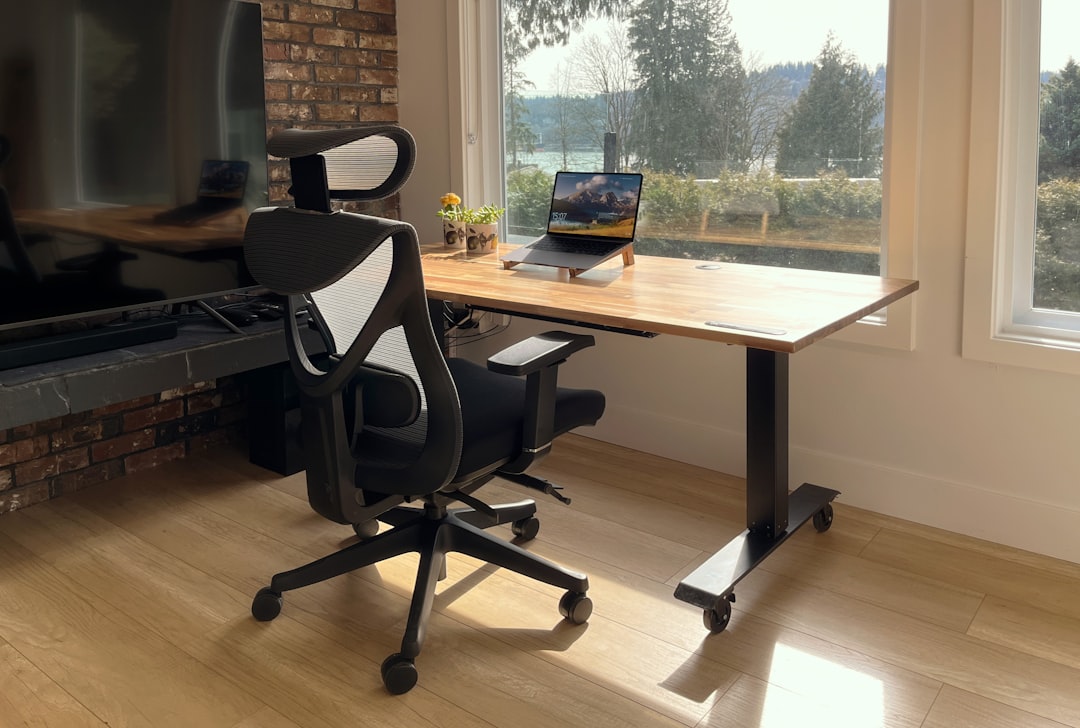
Ergonomics is the foundation of any effective home office setup. Long hours sitting in poorly designed furniture lead to fatigue and pain. Prioritizing ergonomic office chairs, adjustable desks, and supportive cushions reduces physical strain and boosts comfort for all-day productivity.
Key Ergonomic Furniture Pieces
- Ergonomic Office Chairs: Choose chairs with robust lumbar support, adjustable headrests, and flip-up armrests. The Gabrylly Ergonomic Mesh Office Chair supports up to 280 pounds and uses breathable mesh for lasting comfort.
- Standing Desks: Adjustable motorized desks like the FlexiSpot E7 Pro allow you to easily alternate between sitting and standing, easing back pressure and improving energy.
- Lumbar Support Cushions: The Cushion Lab Extra Dense Lumbar Pillow uses advanced Hyperfoam technology for firm support, designed by a physical therapist to promote good posture.
"Investing in quality ergonomic furniture is a game changer — it transformed my workday comfort and focus."
Focus on ergonomics to reduce repetitive strain injuries and maintain concentration. Explore more ergonomic options at SmallBizTrends, Uplift Desk, and Yahoo Entertainment.
2. Enhance Productivity with Smart Tech Accessories
Smart tech and connectivity tools keep your workspace efficient and organized. As your devices multiply, utilizing the right accessories eliminates clutter and improves workflow in 2026.
Must-Have Tech Accessories for WFH
- USB-C and Thunderbolt Hubs: Expand your laptop’s ports with the Belkin Thunderbolt 3 Dock Core offering HDMI and DisplayPort outputs, or the UGREEN Revodok USB-C Hub with multiple USB and microSD slots for budget-friendly versatility.
- Charging Stations: The Anker Prime 200W 6-port charging station harnesses GaN technology to quickly charge several devices while keeping cables tidy.
- Docking Stations and Monitor Arms: Combine USB-C hubs with ergonomic monitor arms like the Ergotron LX Monitor Arm to adjust screen positioning, reducing neck and eye strain.
- Wireless Chargers and External SSDs: Eliminate cable clutter with wireless charging pads and enhance storage speed using external SSDs for seamless file access.
Streamlined tech accessories reduce distractions and interruptions, giving you more focus on meaningful work. Check out reviews and gear at PCMag, HumanCentric, and GSA Furniture Catalog.
3. Incorporate Physical Activity with Under-Desk Treadmills and Standing Mats
Sitting for extended periods harms health and productivity. Introducing movement into your day counters stiffness and energizes your mind.
Products Encouraging Movement
- Under-Desk Treadmills: Devices like the Egofit Walker Pro and UREVO Strol 2E Smart 2-in-1 Foldable Treadmill fit discreetly under your desk, letting you walk lightly while working to meet activity goals.
- Anti-Fatigue Standing Mats: Cushioned mats with durable rubber and contoured edges ease foot strain and offer ankle stretching zones to improve comfort during standing sessions.
"Integrating an under-desk treadmill changed my energy levels throughout the day and helped me stay active without leaving my workspace."
Exploring movement-friendly accessories is vital for maintaining circulation and mental clarity. Learn more from Forbes.
FAQ
What is the most important ergonomic chair feature for WFH?
Look for strong lumbar support, adjustable components like headrests and armrests, and breathable materials. These features collectively support your posture and increase comfort during long hours.
Are standing desks really beneficial?
Yes, standing desks promote movement and can reduce risks associated with prolonged sitting. Adjustable desks let you alternate postures easily, which helps decrease back pain and fatigue.
How do tech accessories improve WFH productivity?
They enhance connectivity, reduce cable clutter, and accelerate data transfer—allowing you to focus more on work instead of managing tech distractions and limited ports.
Can under-desk treadmills really be used while working?
Yes, these treadmills support very low-speed walking suitable for multitasking at a desk. They help maintain daily activity levels without interrupting focus on tasks.
Upgrade your workspace today with ergonomic furniture, smart accessories, and wellness tools to thrive in your 2026 work from home setup.