Cart
0
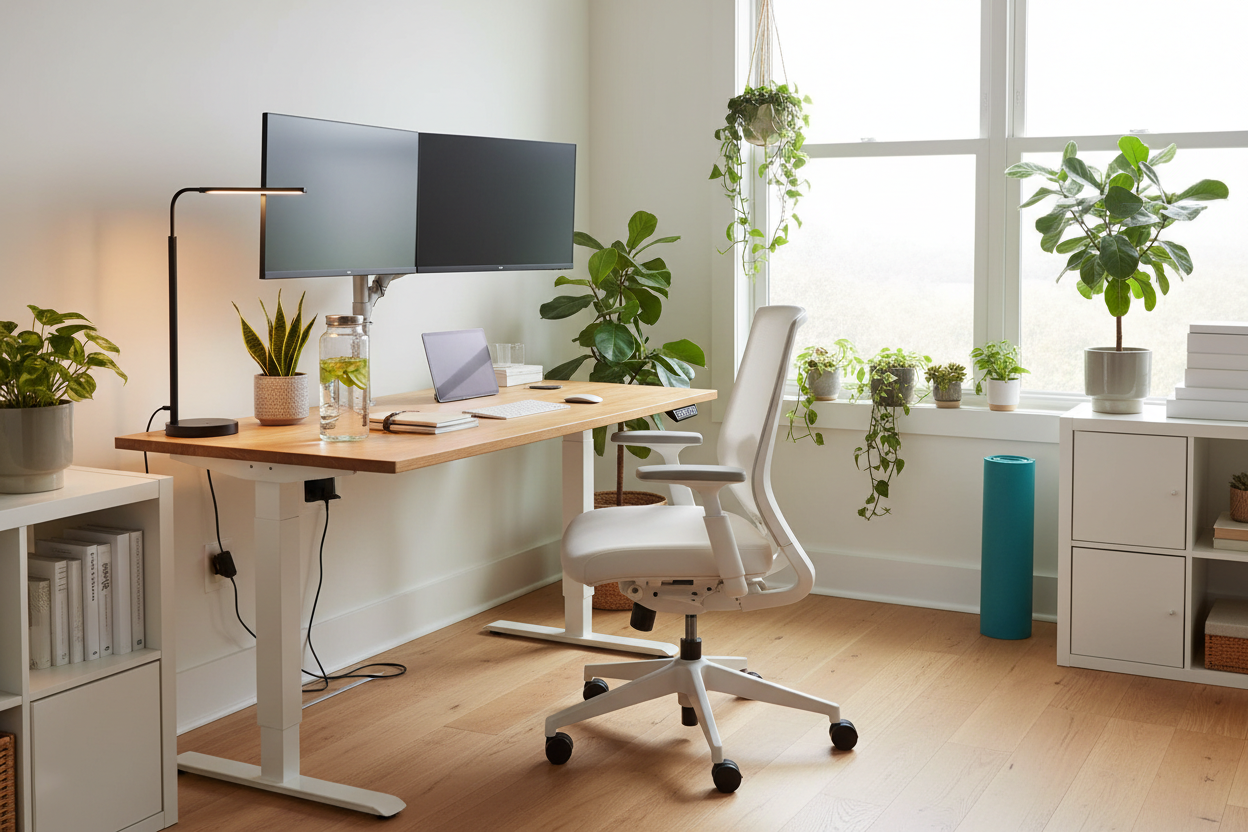
How to Set Up an Ideal Home Office for Better Productivity and Health
Working from home effectively requires a well-designed workspace that boosts focus, comfort, and well-being. This guide offers expert strategies on creating a home office that supports your productivity while nurturing your health.
Key Takeaways
- Designate a dedicated area exclusively for work to foster focus and mental separation from personal life.
- Invest in ergonomic furniture to improve posture, reduce discomfort, and boost productivity by up to 25%.
- Maximize natural light and use adjustable lighting to sustain alertness and minimize eye strain.
- Keep your workspace decluttered and organized to save time and reduce stress.
- Personalize your space with plants, art, and scents to improve motivation and emotional comfort.
- Use noise-canceling tools and set clear boundaries to minimize disruptions from shared household environments.
- Incorporate regular breaks and movement to maintain energy and mental clarity throughout the day.
- Equip your home office with reliable technology and tools tailored to your professional needs.
- Establish clear work-life boundaries to prevent burnout and protect mental well-being.
Table of Contents
- 1. Why a Dedicated Work Area is Critical to Productivity
- 2. Uplifting Productivity with Ergonomic Furniture
- 3. Maximizing Outputs through Natural and Adjustable Lighting
- 4. Declutter and Streamline Your Workspace for Sharpened Focus
- 5. Infuse Your Home Office with Personality and Motivation
- 6. Silencing Interruptions and Shared Spaces with Savvy Solutions
- 7. Injecting Movement and Breaks into Your Routine for Steadier Energy Levels
- 8. Essential Technology Setup for Seamless Remote Work
- 9. Balancing the Work-Home See-Saw
- Conclusion: Crafting a Tailored Home Office That Bears Results
1. Why a Dedicated Work Area is Critical to Productivity
Working from random spots around your home may feel convenient but often harms your ability to focus. Establishing a dedicated workstation sets the psychological stage for work and helps stave off distractions.
- Signals “work mode” to yourself and housemates, reducing interruptions.
- Makes it easier to mentally separate professional and personal time.
- Fosters an atmosphere where concentration can thrive.
According to research, 76% of remote workers report increased effectiveness when working in a defined workspace. Whether a corner desk in your bedroom or a custom setup in a spare room, dedicate a space solely for your professional tasks.
Learn more about optimizing your workspace: Design Your Remote Workspace Tips
2. Uplifting Productivity with Ergonomic Furniture
Ergonomic furniture isn’t merely a comfort luxury – it’s a critical investment for your health and effectiveness during long workdays. Proper chairs and desks encourage good posture, reduce aches, and prevent chronic conditions.
- Improves productivity by 15-25% by lowering physical discomfort.
- Supports spinal alignment to reduce back pain risks.
- Boosts energy by providing comfortable seating and ideal desk height.
Simple adjustments such as screen height alignment with eye level and use of external keyboards help prevent wrist strain and slouching. Height-adjustable chairs with lumbar support and foot clearance are key.
Explore ergonomic furniture benefits here: Ergonomic Workplace Furniture
3. Maximizing Outputs through Natural and Adjustable Lighting
Lighting greatly influences energy and alertness. Natural sunlight regulates circadian rhythms and lifts mood, while poor lighting can cause fatigue and eye strain.
- Position your desk near a window to maximize daylight.
- Arrange screens perpendicular to light sources to avoid glare.
- Use adjustable desk lamps with varied light temperatures to suit different times of day.
Exposure to natural light can increase productivity by up to 15%. For early or late work hours, adaptive smart lighting systems can mimic natural daylight and reduce blue light exposure, preventing headaches and fatigue.
Discover more smart lighting tips: How Your Home Office Design Affects Success
Learn about ergonomics and lighting: Creating the Ultimate Ergonomic Workspace
4. Declutter and Streamline Your Workspace for Sharpened Focus
Cluttered environments zap mental clarity and ramp up stress, silently hindering your focus and efficiency.
- Utilize vertical storage such as wall-mounted shelves or organizers.
- Label drawers and containers for quick access.
- Incorporate visual task boards or whiteboards to track daily priorities.
- Keep only essentials on your desk to maintain tidiness.
Regular decluttering routines cleanse mental cobwebs, enhancing calm and concentration before work starts.
More organization advice here: Home Office Productivity
5. Infuse Your Home Office with Personality and Motivation
A workspace that reflects your personality elevates motivation and reduces burnout by creating emotional comfort.
- Add plants to improve air quality and instill calm.
- Display artwork, photos, or motivational quotes to uplift spirits.
- Choose color schemes that energize or soothe you based on your preferences.
- Use essential oil diffusers with invigorating scents like citrus or peppermint.
Tailoring your environment to suit your daily workflow and industry boosts creativity and maintain focus.
See how personalization transforms workspaces: Creating a Powerful Home Office for Remote Work Success
6. Silencing Interruptions and Shared Spaces with Savvy Solutions
Household noise and interruptions can severely disrupt concentration, especially when working from shared spaces.
- Use noise-canceling headphones to block background noise.
- Employ white noise machines or sound-absorbing panels on walls/windows.
- Set “quiet hours” or coordinate calls with the calmest times at home.
- Create designated zones for calls or focused work distinct from communal areas.
Coordinating schedules and sharing workspace responsibilities can minimize conflicts and interruptions.
More noise management tips: Creating the Ultimate Ergonomic Workspace
7. Injecting Movement and Breaks into Your Routine for Steadier Energy Levels
Long periods of sitting lead to fatigue and mental dullness. Interspersing your day with movement helps maintain energy and cognitive function.
- Adopt the 20-20-20 rule: every 20 minutes, look 20 feet away for 20 seconds to reduce eye strain.
- Schedule short breaks to stretch, stand, or move around.
- Repurpose household items like ironing boards as standing desks.
- Block time for quick walks or light workouts.
Social interactions, even brief, enhance mood and stave off feelings of isolation common in remote work.
Explore effective pause strategies: Journal of Social Sciences, Humanities, and Management Research
8. Essential Technology Setup for Seamless Remote Work
Reliable technology anchors smooth remote work by ensuring communication and workflow run without frustrating interruptions.
- Invest in a fast, stable internet connection to avoid lag and disconnections.
- Use a high-quality webcam with a wide-angle lens for clear video calls.
- Employ noise-canceling microphones to maintain audio clarity.
- Keep collaboration tools and software up-to-date and tailored to your projects.
- Consider dual monitors or larger screens to enhance multitasking efficiency.
Ergonomic lighting and tech accessories further elevate comfort and health during long sessions.
Find top productivity tech gear here: Work From Home’s Best Buys Productivity Gear
9. Balancing the Work-Home See-Saw
Maintaining clear boundaries between work and home life protects wellbeing and prevents burnout.
- Reserve your workspace strictly for work hours.
- End your workday by physically closing or “powering down” the work zone.
- Communicate your work schedule to family or housemates to secure quiet time.
- Rotate workspace use if sharing with others to avoid fatigue and maintain posture variety.
Upholding these boundaries fosters mental separation and guards your zest for life beyond work.
More on managing remote work boundaries: Home Office Productivity
Conclusion: Crafting a Tailored Home Office That Bears Results
To thrive in remote work, thoughtfully design a home office that meets your professional demands and nurtures your health. By combining ergonomic furniture, smart lighting, noise control, organized setups, technology, and personalized touches, you create a productive, comfortable environment. Consistently taking breaks and maintaining boundaries completes the recipe for sustainable success and well-being in your home workspace.
Embrace these expert-backed strategies today and transform your home office into a powerhouse of focus, comfort, and creativity.
FAQ
Q1: How much space do I need for an effective home office?
Even a small dedicated corner with enough room for a desk, chair, and necessary equipment can be effective. The key is that the space is exclusive for work to establish mental and physical boundaries.
Q2: What are the top ergonomic features I should look for in furniture?
Look for chairs with adjustable height, lumbar support, and good cushioning. Adjustable desks that allow you to alternate between sitting and standing positions are also recommended.
Q3: How can I minimize distractions if I share my home with others?
Use noise-canceling headphones, establish “quiet hours,” communicate your work schedule clearly, and consider designating specific rooms or zones for work when possible.
Q4: Are breaks really necessary during remote work?
Absolutely. Regular breaks help reduce eye strain, prevent burnout, and boost long-term productivity by keeping your mind and body refreshed.
Q5: What technology is essential for a smooth remote work experience?
A fast and reliable internet connection, quality webcam and microphone, suitable collaboration software, and ergonomic peripherals like external keyboards and mice are critical for an efficient setup.